Everything You Need to Create
Beautiful Cookbooks

Simple, powerful tools designed for anyone to create professional-quality cookbooks. No design experience required.

Core Features

👁️

Real-Time Preview

See your cookbook exactly as it will print while you're building it. Every change appears instantly - no surprises when you download your PDF.

📸

Photo Resizing & Cropping

Make your family photos look perfect. Resize, crop, and position images exactly how you want them on each page.

🎨

Flexible Page Layouts

Arrange everything your way - multiple recipes per page, mix photos with text, add stories alongside dishes. Complete creative control.

📝

Rich Text Editing

Add as much text as you need with formatting options. Share the stories and memories behind each recipe with bold, italic, and list formatting.

🔄

Reusable Recipes

Create a recipe once, use it in multiple cookbooks. Perfect when everyone in the family wants Grandma's famous cookies in their book.

📚

Multiple Cookbooks

Create as many cookbooks as you want. Make different versions for different family members, occasions, or themes - all in one account.

📖

Chapters & Sections

Organize your cookbook with chapters and sections. Structure it however makes sense - by course, by cook, by occasion, or any way you like.

🖼️

Image Galleries

Add multiple photos to any recipe. Show the finished dish, the preparation process, or cherished memories of cooking together.

📄

Custom Cover Pages

Design a beautiful cover and title page. Add cover images, dedications, and personalize the look of your cookbook.

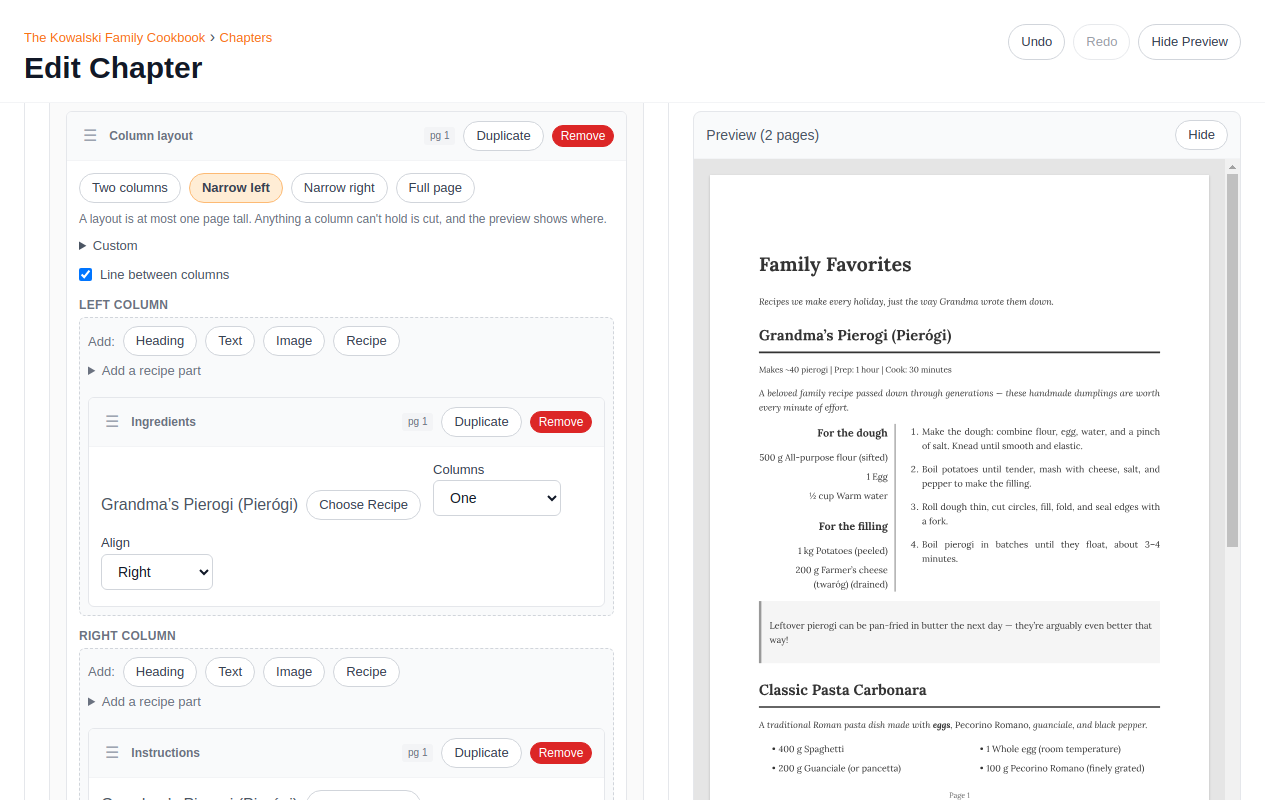
See Your Changes in Real-Time

Every edit appears instantly in the live preview. You always know exactly how your finished cookbook will look — no surprises when you download your PDF.

Drag and drop blocks to rearrange content. Add recipes, photos, and stories right where you want them.

MakeCookbook section editor with live preview showing a cookbook page layout

Recipe Management

Everything you need to capture and organize family recipes

Complete Recipe Details

Capture everything about each recipe - ingredients with precise measurements, step-by-step instructions, serving size, prep time, cook time, and any special notes or variations.

Recipe Search & Library

Quickly find any recipe in your collection with search and sorting. Create each recipe once and reuse it across multiple cookbooks — perfect when everyone wants Grandma's cookies in their book.

Recipe History & Notes

Add the stories behind the recipes - where it came from, who made it famous in your family, special memories, or tips for success.

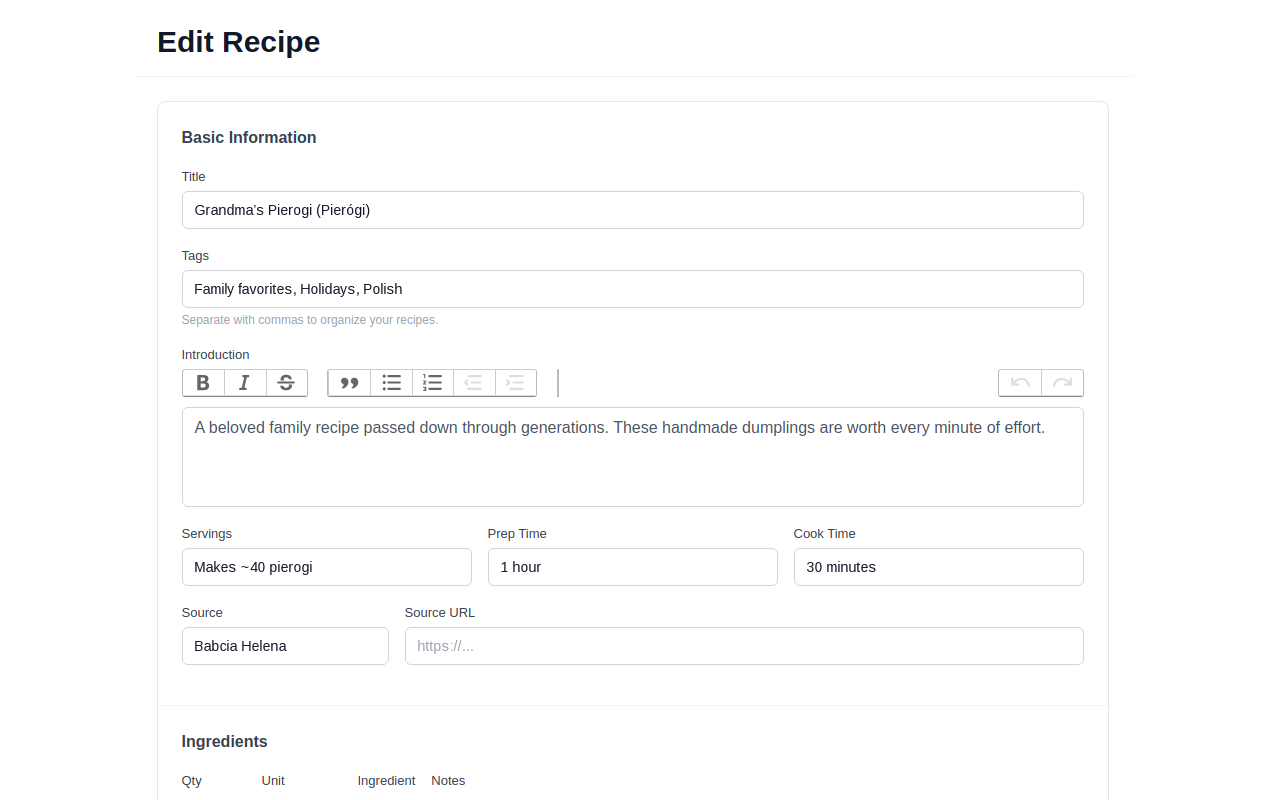
Every Detail, Captured

Ingredients, step-by-step instructions, prep time, cook time, serving sizes — plus the stories behind each recipe.

Create a recipe once and reuse it across multiple cookbooks. Your recipe library grows with you.

MakeCookbook recipe editor showing ingredients, prep time, and cooking instructions

Work Together

Perfect for family projects and fundraisers

👥

Family Collaboration

Invite family members to contribute their recipes. You maintain control over the final cookbook while they add their special dishes.

🏫

Fundraiser Management

Perfect for school or church cookbooks. Collect recipes from many contributors while keeping control over formatting and final layout.

✏️

Editorial Control

Review and edit all contributions before they go into your cookbook. Ensure consistency and quality across all recipes.

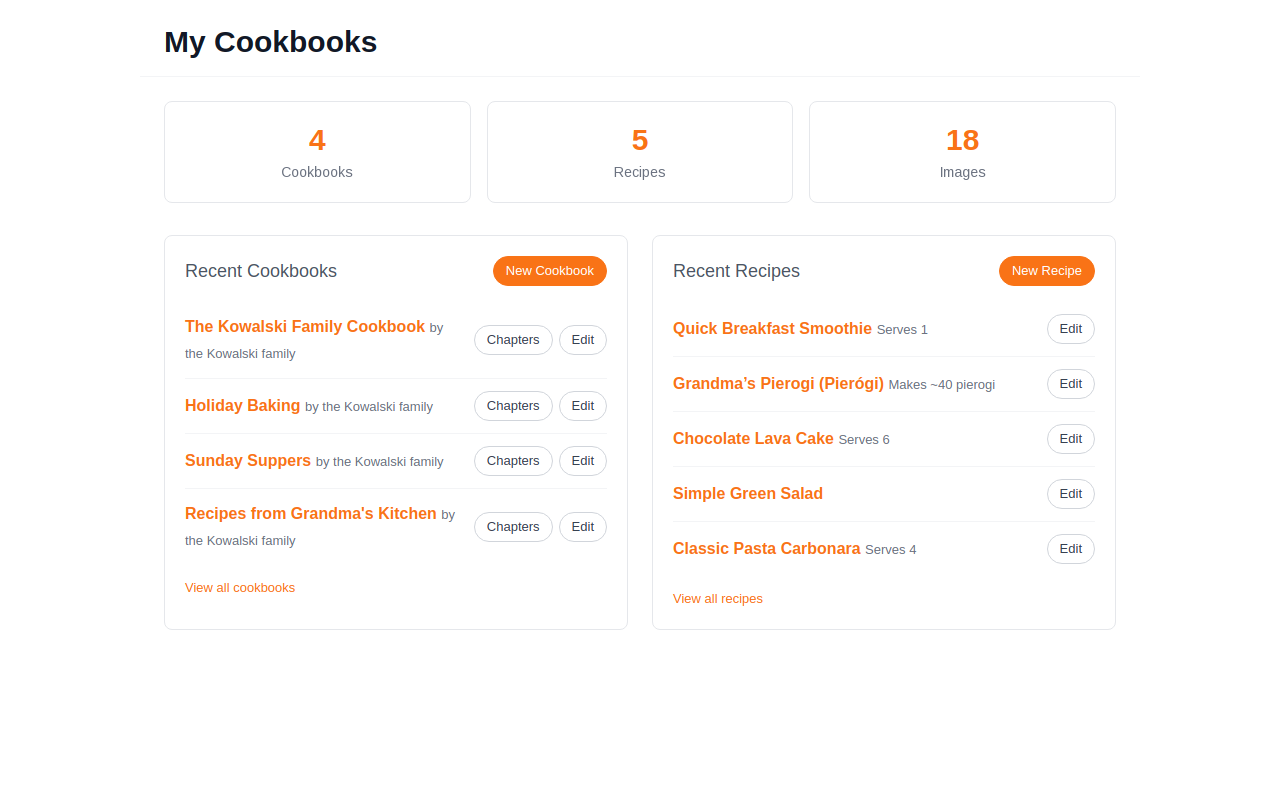
All Your Projects, One Dashboard

Create as many cookbooks as you want. One for each family member, holiday collections, or special occasion editions.

Your dashboard keeps everything organized so you can focus on what matters — the recipes and memories.

MakeCookbook dashboard showing multiple cookbooks organized in one place

Professional Output

📱

PDF Download

Download your finished cookbook as a high-quality PDF. Print it at home, at your local print shop, or through a professional printing service.

🖨️

Print-Ready Format

Your cookbook is automatically formatted for standard 8.5 x 11 inch paper. Ready to print exactly as you see it on screen.

🎨

Professional Styling

Beautiful, clean design that makes your recipes easy to read and your photos shine. Looks professional without any design work.

📊

Automatic Page Numbers

Page numbers are added automatically. Control which sections have page numbers and which don't for complete flexibility.

Ready to Start Creating?

Join families who are preserving their culinary heritage with MakeCookbook

Get Started